
代码集成示例可在穿云代理控制台中获取:
https://console.cloudbypass.com/#/proxy/account
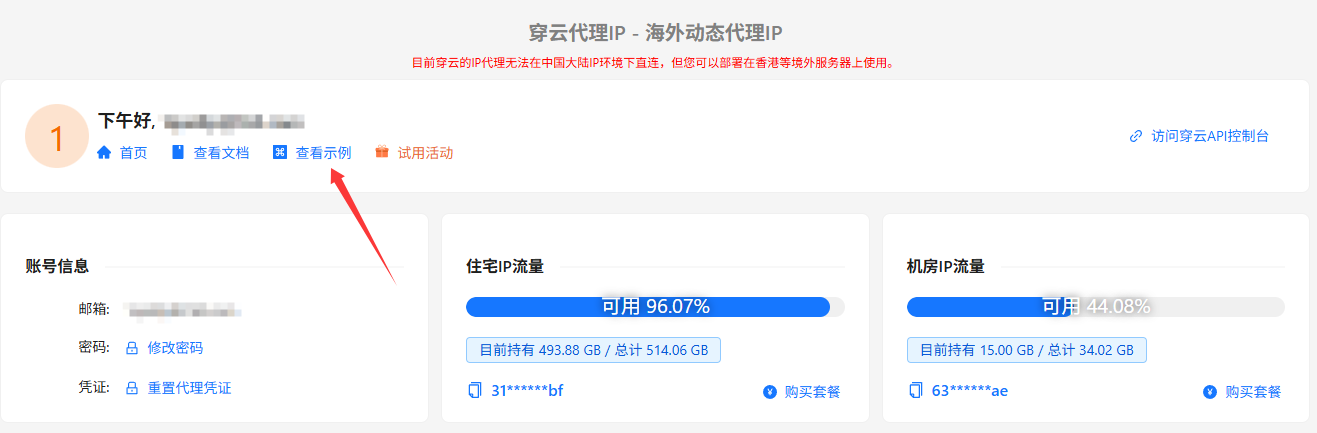
以下是为您优化后的多语言代码示例,已针对 穿云代理 的 HTTP 协议规范进行纠错,并加入了健壮性处理。格式已适配 WordPress,您可以直接复制。
穿云代理代码配置示例(HTTP 协议)
本节提供多种主流编程语言接入穿云代理的代码示例。在配置时,请确保使用从控制台提取的 动态住宅代理 或 动态机房代理 的账密信息。
1. JavaScript (Axios)
针对 Node.js 环境,建议使用 Axios 进行请求。请注意:穿云代理仅支持通过 HTTP 隧道连接。
const axios = require('axios');

// 配置代理参数
const host = 'gw.cloudbypass.com'; // 穿云网关地址
const port = 1288;
const username = 'YOUR_USERNAME';
const password = 'YOUR_PASSWORD';
const targetUrl = 'https://example.com/';

const config = {
    proxy: {
        protocol: 'http',
        host: host,
        port: port,
        auth: {
            username: username,
            password: password
        }
    }
};

axios.get(targetUrl, config)
    .then((response) => {
        console.log('响应内容:', response.data);
    })
    .catch((error) => {
        console.error('连接失败:', error.message);
    });
2. Python (Requests)
Python 是进行数据爬取的常用语言,推荐使用 requests 库。
import requests

# 代理配置信息
host = 'gw.cloudbypass.com'
port = 1288
username = 'YOUR_USERNAME'
password = 'YOUR_PASSWORD'
target_url = 'https://example.com/'

# 统一使用 http 协议头连接穿云网关
proxies = {
    'http': f'http://{username}:{password}@{host}:{port}',
    'https': f'http://{username}:{password}@{host}:{port}'
}

try:
    resp = requests.get(target_url, proxies=proxies, timeout=10)
    resp.raise_for_status()
    print(resp.text)
except requests.exceptions.RequestException as e:
    print(f"请求发生异常: {e}")
3. Python (Aiohttp)
针对高并发异步采集场景,可以使用 aiohttp。
import aiohttp
import asyncio

async def fetch():
    host = 'gw.cloudbypass.com'
    port = 1288
    username = 'YOUR_USERNAME'
    password = 'YOUR_PASSWORD'
    target_url = 'https://example.com/'

    # 构建包含账密的代理 URL
    proxy_url = f'http://{username}:{password}@{host}:{port}'

    async with aiohttp.ClientSession() as session:
        try:
            async with session.get(target_url, proxy=proxy_url, timeout=10) as response:
                html = await response.text()
                print(html)
        except Exception as e:
            print(f"异步请求失败: {e}")

if __name__ == '__main__':
    asyncio.run(fetch())
4. Go (Golang)
Go 语言原生库对代理支持非常友好,性能极佳。
package main

import (
    "fmt"
    "io/ioutil"
    "net/http"
    "net/url"
    "time"
)

func main() {
    proxyHost := "gw.cloudbypass.com"
    proxyPort := "1288"
    username := "YOUR_USERNAME"
    password := "YOUR_PASSWORD"
    targetUrl := "https://example.com/"

    // 解析代理地址
    rawUrl := fmt.Sprintf("http://%s:%s@%s:%s", username, password, proxyHost, proxyPort)
    proxyUrl, _ := url.Parse(rawUrl)

    client := &http.Client{
        Transport: &http.Transport{Proxy: http.ProxyURL(proxyUrl)},
        Timeout:   time.Second * 10,
    }

    resp, err := client.Get(targetUrl)
    if err != nil {
        fmt.Println("请求错误:", err)
        return
    }
    defer resp.Body.Close()

    body, _ := ioutil.ReadAll(resp.Body)
    fmt.Printf("状态码: %d\n响应内容: %s\n", resp.StatusCode, string(body))
}
5. Java (HttpURLConnection)
Java 基础实现,注意需解除系统默认的代理认证限制。
import java.net.*;
import java.io.*;

public class CloudBypassProxy {
    public static void main(String[] args) {
        final String authUser = "YOUR_USERNAME";
        final String authPassword = "YOUR_PASSWORD";
        final String proxyHost = "gw.cloudbypass.com";
        final int proxyPort = 1288;
        final String destURL = "https://example.com/";

        // 关键:解除 JVM 对部分代理认证方案的禁用限制
        System.setProperty("jdk.http.auth.tunneling.disabledSchemes", "");

        Authenticator.setDefault(new Authenticator() {
            @Override
            protected PasswordAuthentication getPasswordAuthentication() {
                return new PasswordAuthentication(authUser, authPassword.toCharArray());
            }
        });

        try {
            Proxy proxy = new Proxy(Proxy.Type.HTTP, new InetSocketAddress(proxyHost, proxyPort));
            URL url = new URL(destURL);
            HttpURLConnection connection = (HttpURLConnection) url.openConnection(proxy);
            connection.setConnectTimeout(10000);

            try (BufferedReader in = new BufferedReader(new InputStreamReader(connection.getInputStream()))) {
                String line;
                while ((line = in.readLine()) != null) {
                    System.out.println(line);
                }
            }
        } catch (Exception e) {
            e.printStackTrace();
        }
    }
}